I've watched dozens of organizations migrate to cloud-based access control systems over the past few years. Most treat it like a hardware upgrade—rip out the old server, install the new cloud platform, done.
That approach fails almost every time.
The problem isn't the technology. Cloud-based access control works. The issue is that companies skip the architecture audit and end up moving their mess from on-premises servers to the cloud.
The Real Problem Isn't On-Premises vs. Cloud
Cloud access control gets sold on three promises: enhanced security, cost savings, and remote management. All true—when implemented correctly.
But here's what I see happening: Organizations have access logs in one system, incident reports in another, user credentials in a third. No dashboard ties it together. No single source of truth.
When you migrate that fragmented setup to the cloud, you're just running disconnected systems in a different location.
The architecture stays broken.
According to recent data, 90% of organizations manage their risk and compliance operations in silos. Those same organizations experience higher breach frequencies. In access control, this means security teams can't see the full picture when incidents occur.

What Successful Migrations Look Like
Organizations that modernize access control successfully start with a Blueprint.
Map your current systems. Identify every integration gap. Define your KPIs—response time, incident resolution speed, access audit compliance. Then build your cloud stack around measurable outcomes.
I learned this from watching implementations go sideways. One client migrated to cloud access control without auditing their user database first. They transferred 400+ user credentials from their old system.
Turns out 87 of those people no longer worked at the company.
Data migration integrity matters. Use the transition as an opportunity to verify and clean your user database. Make sure everyone listed still works for your company or lives in your building. Lingering access rights create security vulnerabilities.
The Integration Challenge
Most cloud access control systems offer more features than traditional setups. You get QR codes for visitors, biometric facial recognition, fingerprint scanning, NFC phone access, Bluetooth credentials.
The challenge isn't technical compatibility. It's figuring out which credentials to implement and how to manage them.
Organizations are creatures of habit. They've used fobs and cards for years. When you introduce biometric collection, mobile credentials or QR code distribution, they need a process for managing that expanded credential ecosystem.
This is where experienced integrators become valuable. You need someone who's solved these problems before and can guide you through the operational changes that come with better technology.

Why Cloud Systems Actually Cost Less
I hear two misconceptions constantly: cloud systems are less secure, and they're more expensive.
Both are wrong.
Major cloud providers like Azure, Google Cloud, and AWS invest billions in security infrastructure. They employ expert security teams. Their encryption and access protocols exceed what most individual buildings can implement on-premises.
The cost argument ignores hidden expenses. On-premises systems require server maintenance, power consumption, IT troubleshooting, and manual system updates. When your server goes down, someone has to fix it.
With cloud systems, the provider handles all of that. You pay a subscription fee and eliminate the operational overhead.
Legacy systems also become expensive to maintain over time. As components age, replacement parts become harder to find. One report found that outdated systems can increase annual maintenance budgets by 15%.
The AI Integration That's Coming
I want to be clear about something: AI integration with access control doesn't exist yet in the way I'm about to describe. This is future-looking.
But I'm excited about where this technology is headed.
Cloud-based systems will eventually use AI to monitor access patterns across all entry points. When the AI detects anomalous behavior—someone attempting to access the same door multiple times, unusual access times, pattern deviations—it can alert security personnel or property managers in real time.
This shifts security from reactive to proactive. Instead of reviewing logs after an incident, you prevent breaches before they occur.
The reason this becomes feasible with cloud systems is simple: the infrastructure is already there. Adding AI capabilities to on-premises systems is significantly harder.

Critical Preparation Steps
If you're considering migrating to cloud-based access control, here's what you need to prepare:
Define administrative roles clearly. Who can add users? Who can remove access? Who can modify door settings versus updating unit numbers? Role-based access control for your administrators prevents security gaps and confusion.
Enforce strong password requirements. Cloud systems are accessible from anywhere. Weak administrative passwords create vulnerabilities even in perfectly configured systems. Make sure your team uses passwords that can't be easily compromised.
Provide adequate training. Your administrators need to know exactly where to navigate within the system to perform their specific functions. Training isn't optional—it's what prevents operational problems after go-live.
Properly decommission old servers. Your old access control server contains sensitive data: user credentials, access patterns, possibly PIN codes. Make sure that data is either securely migrated or properly destroyed. Leaving old servers accessible creates security vulnerabilities during the transition.
Integration Opportunities
Cloud-based access control can also integrate with other building systems in ways that create comprehensive security.
Elevator controls: In multi-tenant buildings, you can restrict elevator access so visitors buzzed in through the intercom can only reach specific floors. This creates granular access permissions beyond simple door control.
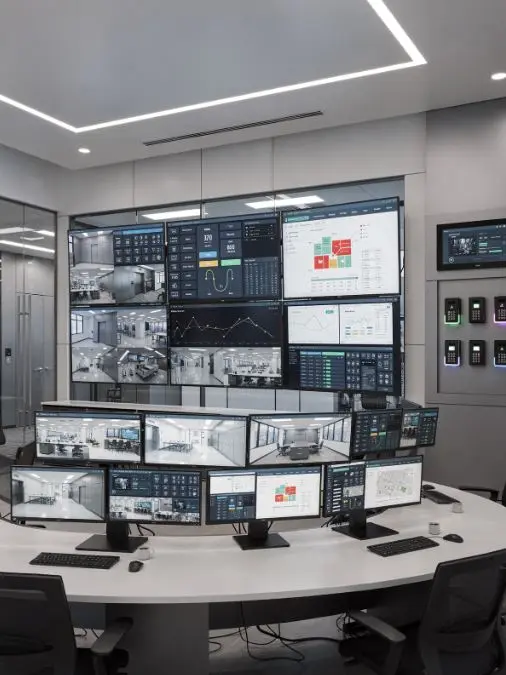
Video surveillance: When someone uses their credential to open a door, the system logs that event and pairs it with visual confirmation from security cameras. You get both the electronic record and visual verification in one integrated system.
Fire alarm panels: During emergencies, the fire alarm system can trigger your access control to unlock specific doors, ensuring proper egress. This safety integration is essential for building code compliance.
These integrations are possible because both cloud-based and on-premises systems are designed to interoperate with other building technologies. Each can integrate effectively when properly designed and configured, with the specific approach depending on the system architecture, project requirements, and operational preferences rather than the deployment model itself.
What I Tell Organizations Considering Migration
Choose a provider with extensive cloud access control experience. You want a company that's been implementing these systems since cloud-based solutions emerged—not someone learning on your project.
Every single client I've worked with who migrated from conventional access control to cloud-based systems prefers the new solution. 100% of them have commented that they're glad they made the switch.
But that satisfaction comes from proper implementation.
The organizations that struggle are the ones who treat migration as a product swap instead of a modernization project. They skip the architecture audit, ignore integration planning, and fail to prepare their administrative teams.
Audit your current access control stack. Document every system and data silo. Build a modernization roadmap that prioritizes integration and dashboards before you migrate to the cloud.
In many CRM environments, organizations have accumulated multiple legacy tools over time. These systems were often implemented to solve individual problems, not to work together. Because they don’t share data effectively, teams are left without a single, reliable view of the customer—and decisions are made using incomplete or outdated information.
The same issue shows up in physical access and security environments. It’s common to find multiple legacy access systems operating within the same building or across a broader portfolio. Each system holds its own data, fragmenting visibility across platforms. As a result, operators lack a clear, unified view of users, doors, and events.
This is where many organizations go wrong. The real problem isn’t whether a system is cloud-based or on-premises. The real issue is system design.
Effective solutions start with architecture, not technology choices. That means defining how systems connect, where data should live, and how information flows across the organization—before selecting specific tools or platforms.
In short, poor outcomes are usually the result of poor system design, not the deployment model itself. Cloud access control delivers on its promise when the right foundation is in place from the start.